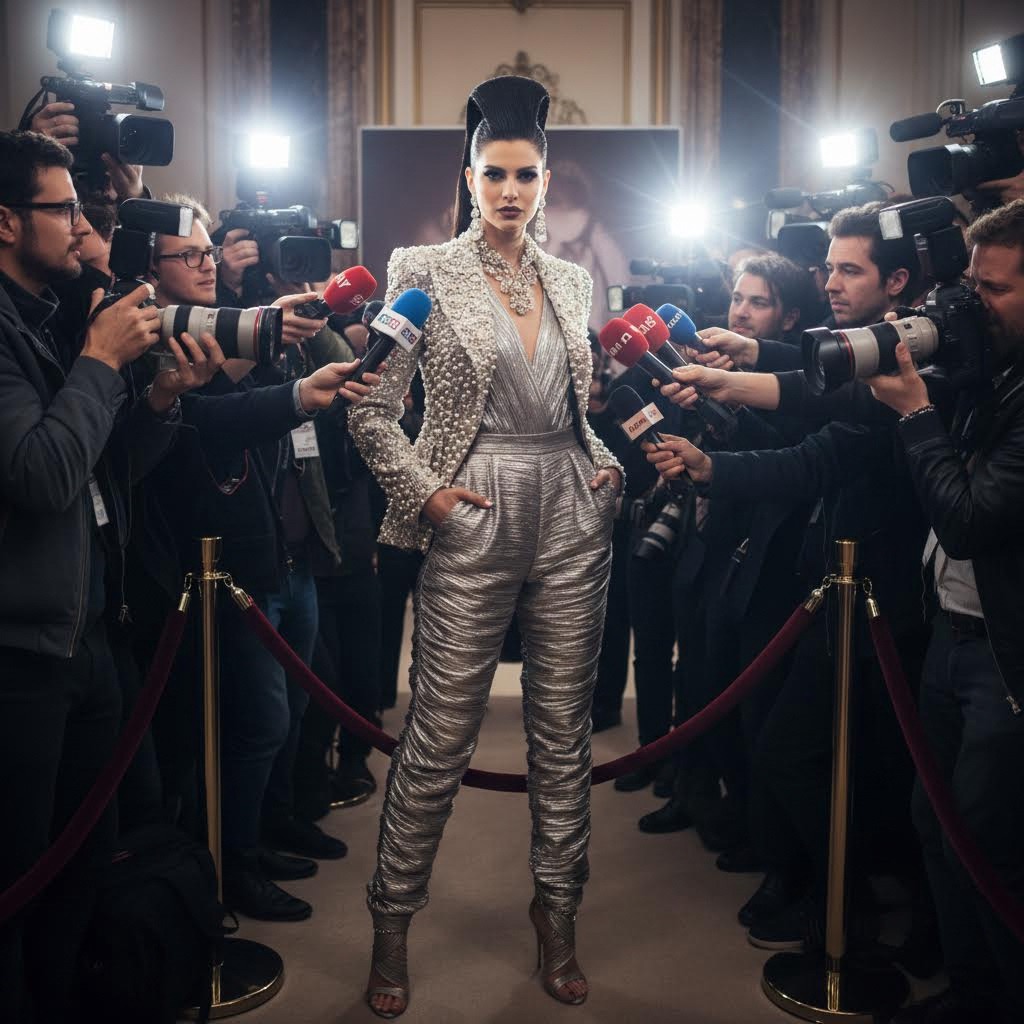
Most portrait filters only change color and skin texture. Fashion paparazzi generation is different: it creates a complete story frame. You are no longer standing in a neutral space. You are positioned in a high-pressure media scene with reporters, camera lenses, microphones, flash bursts, and red-carpet energy. A strong fashion paparazzi AI result should look like an event photo taken in motion, not like a static collage.
What defines a convincing paparazzi scene
There are four core elements: subject styling, media crowd arrangement, interview props, and light behavior. Subject styling includes outfit silhouette, posture, and expression. Crowd arrangement decides whether the scene feels chaotic or composed. Props such as microphones and press badges establish context instantly. Light behavior, especially flash and rim light, creates authenticity. When all four align, the output feels editorial and cinematic.
Input photo recommendations
- Use a half-body or full-body portrait whenever possible.
- Pick a neutral or simple source background for clean extraction.
- Choose photos with clear face detail and non-blurry edges.
- Avoid extreme fish-eye angles unless you want stylized distortion.
Full-body inputs usually perform best because fashion scenes rely heavily on clothing shape and stance. If you only have a close-up portrait, keep prompt instructions focused on upper-body interview framing.
Prompt structure that improves control
Use a direct structure: "fashion celebrity interview scene, press reporters surrounding subject, multiple microphones, camera flash, red carpet ambiance." Then add style controls such as "high-contrast editorial lighting" or "soft luxury event lighting." If you want a fashion-week look, include terms like "runway backstage" or "premiere press wall." Keep prompt wording concrete and visual.
Pose and expression planning
In paparazzi images, posture communicates status. Upright stance with relaxed shoulders and calm gaze suggests confidence. Hand placement can make the frame more natural: one hand in pocket, one hand mid-gesture, or both relaxed by the side. Neutral expression usually works better than exaggerated smiles because flash-heavy environments already create strong drama. If your source pose is too casual, generate multiple options and pick the version with strongest authority.
How to avoid fake-looking outputs
The most common failure is inconsistent lighting. If the subject face is softly lit but the scene has aggressive flash direction, the composite feels wrong. Another issue is unrealistic microphone placement that intersects hands or clothing. To improve realism, ask for "natural hand and prop positioning" and "consistent flash direction." Also avoid overloading with too many event details in one prompt. Clear hierarchy beats noisy complexity.
Best use cases
This style is strong for profile branding, campaign mood boards, digital magazine concepts, and social content where you want authority and visibility. Influencers use it for persona building. Marketing teams use it for mock campaign narratives before production shoots. Designers use it to prototype fashion storytelling directions quickly. It is especially effective when you need visual impact in a crowded feed.
Practical workflow for better results
- Generate three scene variants with different lighting mood.
- Pick one composition with clean subject focus.
- Refine outfit and color direction in a second pass.
- Export high-quality version for publishing or design layout.
This two-pass method is usually faster than trying to force perfect output in a single generation.
How to make the scene feel premium
Premium-looking outputs usually come from controlled visual hierarchy. Keep your subject as the brightest focal area, then place reporters and cameras as framing elements instead of equal competitors. Clothing texture should read clearly even under flash. Metallic fabrics, clean tailoring, and monochrome palettes often work better than busy patterns because they hold shape under high-contrast lighting. If the scene feels crowded, prompt for \"clean composition with clear subject separation.\"
Background choice also matters. A press-wall backdrop creates formal event energy, while city-night stairs create cinematic glamour. For brand-like consistency, pick one environment and iterate outfit and pose inside that space rather than changing everything at once.
Branding and content strategy use
Beyond personal photos, this tool is useful for campaign ideation. Teams can test concept directions before booking locations or photographers. A content creator can produce a full week of announcement visuals from one base portrait by changing outfit mood and event environment. This reduces production cost and speeds iteration. It also helps align internal stakeholders because everyone can react to concrete frames instead of abstract mood descriptions.
FAQ
Can this tool keep my face accurate in a crowded scene?
Yes, if your source portrait is sharp and the prompt clearly prioritizes identity preservation.
What is the best photo crop for this effect?
Half-body or full-body usually works best because fashion silhouette and pose are key to realism.
How do I avoid too many microphones or visual clutter?
Add constraints like \"balanced press crowd\" and \"clean composition\" to keep the scene readable.
Conclusion
Fashion paparazzi generation is not only about adding flashes. It is about constructing a believable media moment around your identity. With a clean source photo and focused prompt structure, you can produce high-energy visuals that look magazine-ready. If you want a confident public-facing style with strong storytelling value, this is one of the most practical tools to start with.