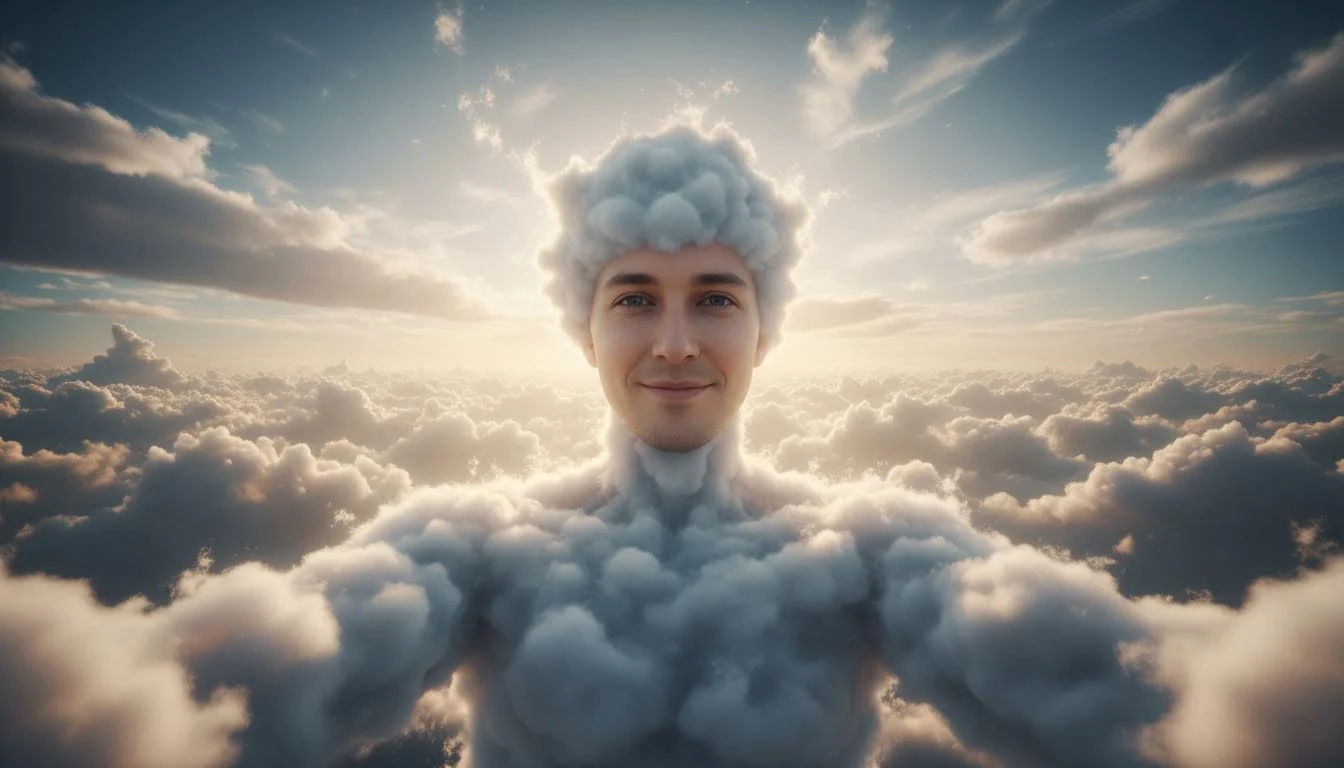
Cloud-body art transforms a normal human portrait into something mythic and atmospheric. Instead of skin or fabric, the body appears made from mist, vapor, and sky volume. A high-quality photo to cloud body result feels like concept art, not a random filter. The face remains readable, the body silhouette stays coherent, and the cloud texture follows lighting direction naturally. This balance is what makes the style useful for storytelling, branding drafts, and high-impact social visuals.
Why cloud-body style stands out
Most portrait effects focus on color grading or simple texture overlays. Cloud-body transformation changes visual physics. You get depth, translucency, and a sense of scale that ordinary edits cannot reproduce. This instantly creates a mood of dream, fantasy, or transcendence. Because clouds are associated with sky and motion, the result often feels open, cinematic, and emotionally expansive.
Best source image characteristics
- Centered subject with clear head and shoulder separation.
- Moderate contrast so face detail remains stable.
- Minimal background clutter to prevent texture conflicts.
- Resolution high enough to keep edge transitions smooth.
A clear portrait gives the model stronger structural guidance. If the source is messy, the cloud effect can lose silhouette clarity and look overly abstract.
Prompt strategy for controlled results
Use prompts that define cloud type, lighting, and mood in one line. Examples: "human body made of soft cumulus clouds, warm sunrise backlight, cinematic depth" or "vapor silhouette with cool twilight sky, gentle rim light, ethereal portrait." If you want denser texture, ask for "layered cloud volume." If you want cleaner face readability, include "clear facial details, soft body vapor." Precision helps prevent muddy outputs.
Color direction and atmosphere
Color choices dramatically change interpretation. Warm gold-and-cream skies feel hopeful and uplifting. Blue-gray tones feel introspective and futuristic. Pink-purple gradients feel romantic or dreamy. Decide the emotional goal first, then match palette. Consistency between face lighting and cloud color is essential. When they conflict, the image looks composited instead of integrated.
Use cases that benefit from this look
Cloud-body visuals are strong for album art, mood campaigns, sci-fi concept boards, spiritual branding, and social covers that need a "scroll stop" effect. Designers also use them as ideation starting points for poster systems and visual narratives. Because the style is abstract but identity-aware, it works for both personal and commercial creative tasks.
Practical quality checks
- Inspect edges around hairline and neck for unnatural cutouts.
- Check whether facial features remain readable at thumbnail size.
- Confirm cloud density is balanced and not over-smoothed.
- Make sure background sky complements, not overwhelms, the subject.
If details collapse, reduce effect intensity and regenerate with clearer structure instructions.
Creating a series instead of one image
Cloud-body visuals become more powerful when developed as a series. Start with one neutral hero frame, then create variations by changing sky time, contrast level, and cloud density while keeping pose and identity stable. This creates brand consistency and gives you options for thumbnails, banners, and full-size assets. A series also helps you compare mood direction objectively instead of overcommitting to one generation.
Try a three-layer strategy: dawn palette for optimistic tone, blue-hour palette for contemplative tone, and high-contrast storm palette for dramatic tone. The subject remains the same, but narrative feeling shifts. This is especially useful for creators building campaigns with multiple touchpoints.
Export and post-production notes
Before final export, verify detail retention around face contours and shoulder edges. If cloud texture appears too soft, sharpen lightly in post while protecting skin detail. If highlights clip in bright skies, reduce whites and recover texture for a cleaner cinematic finish. For large-format output, keep master files and avoid repeated recompression. Good export discipline preserves atmosphere and keeps the artwork usable across platforms.
FAQ
Can I keep my original outfit and only convert body texture?
Yes. Ask for partial cloud integration and specify which regions should remain unchanged.
Does this style work for group photos?
It can, but single-subject portraits usually produce cleaner cloud transitions and better identity retention.
How many prompt iterations are recommended?
Three to six focused iterations are usually enough for a strong final render.
Mistakes to avoid
The main mistake is overloading prompts with too many style references in one generation. Another issue is using extremely dark source photos, which can force noisy texture. Keep prompts focused, lighting coherent, and composition simple. Strong cloud-body results usually come from disciplined iteration, not one complicated command.
Conclusion
Cloud-body transformation is one of the most expressive identity-preserving styles available right now. With a clean source image and controlled prompt language, you can produce images that feel cinematic, emotional, and original. Whether for design experiments or social storytelling, this style offers high visual payoff in a short workflow.