Logout
Are you sure you want to logout? You will need to log in again to continue using.
My Points
0
Available Points
💡 Points Usage Guide
Points can be used for AI features, each generation consumes corresponding points.
Register to get free points, VIP users enjoy more benefits!
Upload your photo to create clean line art
Supported formats: JPG, PNG, WebP (Clear portrait photo with good lighting recommended for best results)
0/200
AI is creating your line art...

Photo to Line Drawing

Turn portraits, pets, and couple photos into clean line art, minimalist outlines, and print-ready wall art in seconds.

Line drawing result
Original photo
Original
Line Drawing Created

AI Line Drawing Generator for Portraits, Gifts, and Minimal Wall Art

AI line drawing technology preview
Portrait line drawing conversion result

🖼️ Minimalist Portrait Line Art

Turn portraits into clean line art with balanced contours and simple black-ink style. This look works well for profile graphics, framed prints, and modern decor because it keeps the subject recognizable while removing visual clutter. See how it works.
Couple line drawing preview
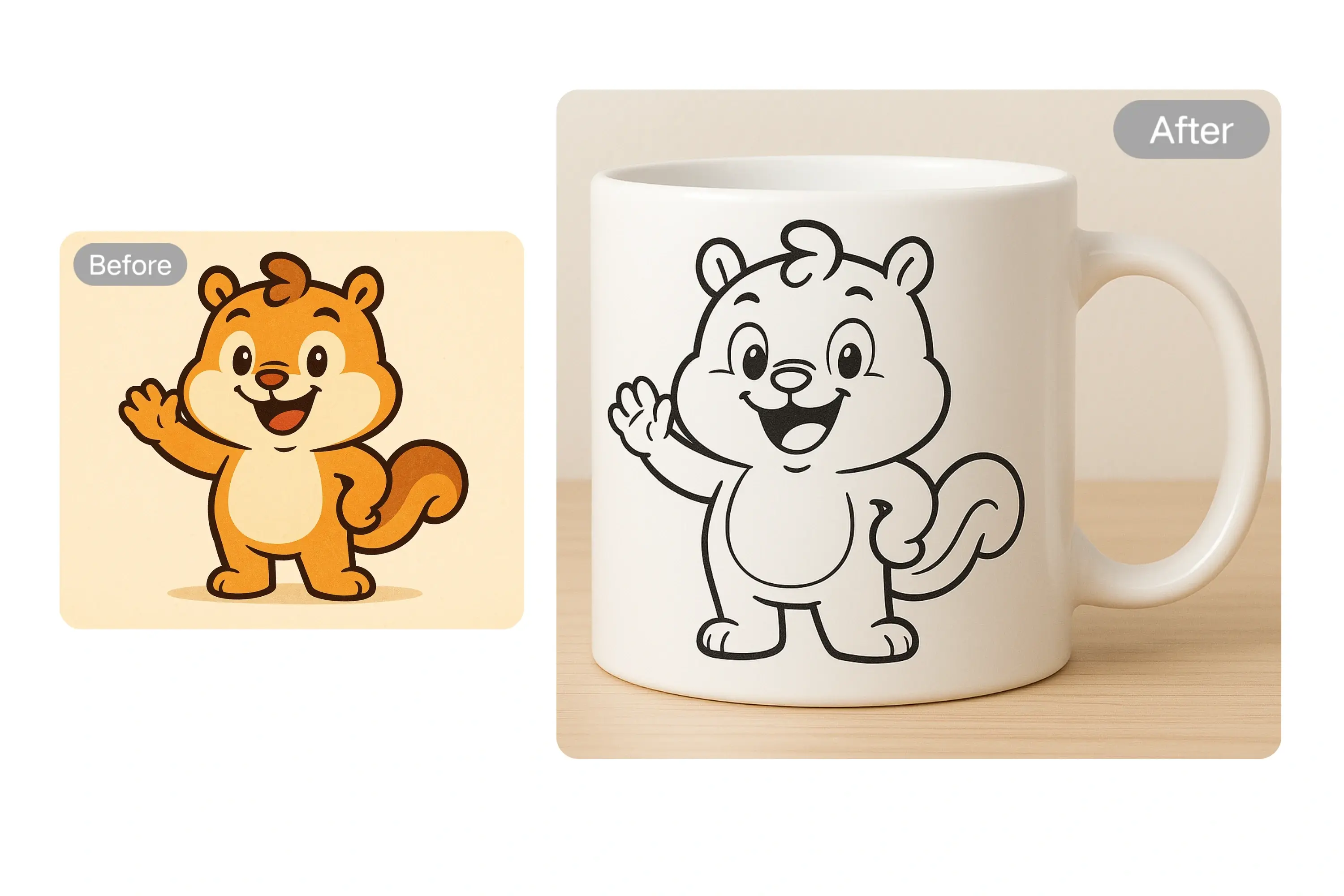
Couple and keepsake line art

💞 Couple, Family, and Pet Keepsakes

Convert meaningful photos into elegant outline art for anniversary gifts, wedding keepsakes, family prints, and pet memorials. Clean line drawing styles are especially strong for emotional photos because they feel personal without looking overprocessed. Create a keepsake.

Line drawing design technology
Floral and outline line art variations

🌸 Tattoo, Floral, and Outline Concepts

Use line drawing results as a fast starting point for floral outlines, symbolic tattoo references, contour posters, and simple branding visuals. The generator is useful when you want a cleaner outline look before committing to a final design direction. Try outline styles.

Decor line drawing style preview
Print-ready line art for decor and socials

🛍️ Print, Decor, and Creator-Ready Output

Create line art that fits framed wall prints, Etsy-style products, creator assets, and simple branded visuals. The style is especially strong when you want something cleaner than a painting but more intentional than a raw photo. Create print-ready art.

Use Cases for Photo to Line Drawing

Portrait line drawing example

Portrait Wall Art

Turn selfies and portraits into simple black-and-white line art for wall decor, profile art, and creator branding. This is one of the cleanest ways to turn a photo into something graphic, elegant, and easy to print.

Couple line drawing example

Couple and Wedding Gifts

Convert engagement, wedding, and anniversary photos into elegant keepsake art. Minimal line drawings work especially well for framed gifts, printed cards, and memory books because the style feels timeless and personal.

Floral line drawing example

Floral and Tattoo Outlines

Try floral contour looks, symbolic outline compositions, or tattoo-inspired references when you want something simpler than a full illustration. This is useful for concepting before moving into a final tattoo or print design.

Decor line drawing example

Decor and Creator Assets

Use line art for social banners, printable decor, product mockups, and simple creator visuals when you want a more polished look than a plain photo but less texture than a painting style.

What Users Are Saying

A
Alice Portrait Illustrator
★★★★★
I turned a simple portrait into clean line art that looked ready to frame. The outlines were elegant enough to use for both wall decor and a portfolio mockup.
B
Ben Tattoo Artist
★★★★★
The floral outline results were great for tattoo concepting. I could test several contour directions before refining the final design by hand.
C
Clara Wedding Seller
★★★★☆
Couple photos convert beautifully. My customers love the clean keepsake look because it feels more premium than a generic photo filter.
D
Diana Pet Parent
★★★★★
I used a pet photo and got a simple memorial-style drawing that looked perfect for a small print. It felt tasteful instead of overdone.
E
Ethan Etsy Seller
★★★★★
This is one of the fastest ways I found to test print-friendly line art ideas for digital products and personalized gifts.
F
Fiona Interior Stylist
★★★★☆
Minimal line portraits fit modern interiors surprisingly well. I can preview whether a client photo works as framed decor before printing anything.

How to Use

1

Upload a Clear Photo

Use a portrait, pet, or couple photo with clear subject edges for the cleanest contour result.

2

Choose Line Style

Guide the generator with prompts like minimalist outline, one-line portrait, floral contour, or bold black ink.

3

Generate and Download

Create your line art in seconds, then download or retry until it matches the print or gift look you want.

Frequently Asked Questions - Photo to Line Drawing

How do I convert a photo to line drawing online?

Upload a clear photo, choose the line style, and click generate. The AI extracts contours and details to create a downloadable line drawing in seconds.

Is the photo to line drawing converter free?

Yes. You can start with free conversions. If you need more usage, you can continue with credits.

What is the difference between line drawing and sketch?

Line drawing emphasizes clean outlines and structure, while sketch styles usually include more shading and textured strokes.

What photos work best for AI line drawing?

Use high-resolution photos with good contrast and clear subject edges. Portraits, pets, couples, floral compositions, and gift-ready photos usually produce the best line art results.

Can I use line drawing results for commercial projects?

Yes, as long as you own or have permission for the source image and comply with copyright and platform requirements.

Can I control line thickness and detail level?

Yes. You can guide results with prompts such as minimal outline, bold contour, one-line portrait, floral outline, or detailed ink style.

Does photo to line drawing work on mobile?

Yes. You can upload and generate line drawings on iOS and Android browsers without installing an app.

How long does line drawing conversion take?

Most line drawing generations finish in 10 to 30 seconds depending on image size and server load.

Pillar and Tool Navigation

Tool Page

This art tool belongs to the Photo to Art Hub hub. Start from the hub to compare oil painting, watercolor, line drawing, anime, and related styles before choosing a workflow.

Open pillar page -> Photo to Art Hub

Art Workflow Switchboard

This tool page is one stop in a larger art workflow. Compare nearby styles in one click, then return to the hub when you need broader side-by-side decisions.